
How to Track Climbing Progress and Find Weaknesses (Using Insight in ClimbingNote+)
This guide is for climbers asking practical questions: how to track climbing progress, why progress stalls, and how to use climbing training analysis to fix it.
Why Most Climbers Feel Stuck
Many climbers train hard but do not know whether they are improving. You might feel stronger, but your send rate does not move. Or you climb more, but plateau at the same grade.
Most climbers plateau not because they lack strength, but because they lack feedback.
The real question is not "am I climbing more?" It is:
- Is my send rate increasing?
- Which styles are improving?
- Which tags show low conversion?
- Where is my effort not converting to results?
That is why structured climbing progress tracking matters. With a climbing progress tracker, your training decisions stop relying on memory.
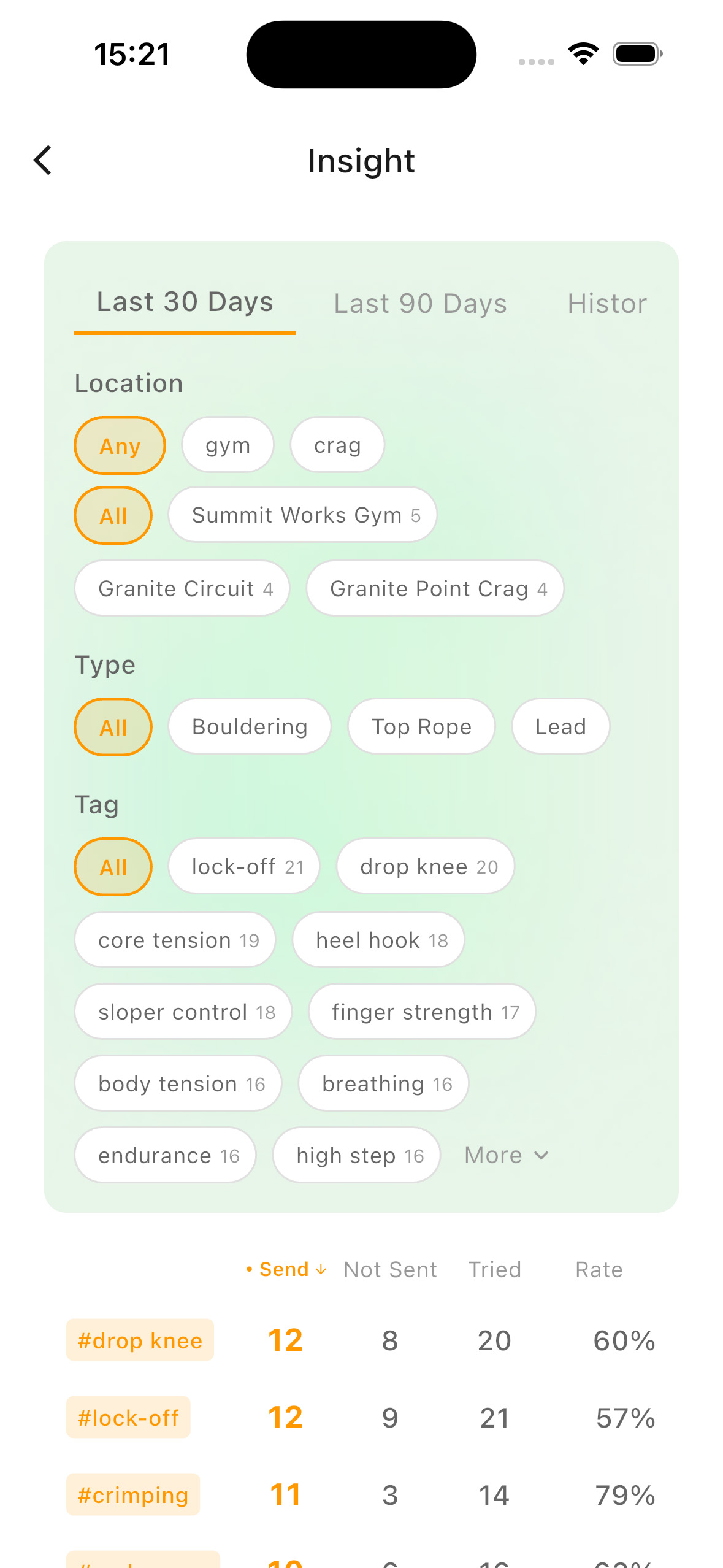
Use Insight as your climbing log app for climbing training analysis: choose a 30-90 day window, filter by gym/crag and style, then sort by send rate and attempts to detect weaknesses.
What Is Send Rate in Climbing?
Send rate is the percentage of attempts that result in completed climbs. It separates effort from conversion.
For example:
- 20 attempts, 10 sends -> 50% send rate
- 10 attempts, 8 sends -> 80% send rate
Tracking send rate over time shows whether your technique is improving, not just your session volume.
Example: Same Grade, Different Progress
Two climbers both attempt V5:
Climber A
20 attempts, 8 sends -> 40%
Climber B
12 attempts, 9 sends -> 75%
Both climbed V5. Only one improved efficiency. Progress is not just grade, it is conversion.
Why 30-90 Day Windows Matter
Daily sessions fluctuate. Real progress appears in trends.
Short windows show noise. Medium windows show adaptation.
That is why Insight defaults to 30 days: enough data, low distortion.
What Insight Tracks for Climbing Training Analysis
Insight turns climbing logs into a usable climbing weakness analysis table. For each tag, style, and grade context, it shows:
- Send - completed climbs
- Not Sent - attempts not completed
- Tried - total attempts
- Rate - send rate percentage
This is useful for both bouldering progress and lead climbing training, because it separates volume from conversion.
How to Track Climbing Progress with Insight
Instead of guessing why progress feels random, read Why Your Climbing Progress Feels Random (And How to Fix It) for the full diagnosis model.
1Set a comparison window
Start with Last 30 Days, then compare with Last 90 Days. This is the fastest way to evaluate near-term and mid-term trend changes.
2Filter context before conclusions
Choose one location type (gym or crag), then one climbing type (bouldering, top rope, or lead). This avoids mixing unrelated sessions.
3Use grade plus style filters
Grade tells you level progression. Style and tags reveal movement gaps. Use both for complete climbing training analysis.
4Sort for weakness detection
- Sort by Not Sent (high) to spot repeated failure patterns
- Sort by Rate (low) to identify stable weak styles
- Sort by Tried (high) to see where effort is concentrated
- Sort by Send (high) to confirm reliable strengths
How to Read Your Send Rate Climbing Data
High Tried + Low Rate
High effort, low conversion. This often signals a clear technical bottleneck.
Low Tried + Low Rate
Likely underexposure. Add controlled attempts before treating it as a major weakness.
High Send + High Rate
A current strength. Keep it active, but shift more training time to lower-rate tags.
Simple rule: keep one confidence style and one weakness style in each weekly cycle.
How to Break a Climbing Plateau Using Data
If your grade has not moved in months:
- Check which styles have high attempts but low send rate
- Add focused sessions on that style
- Re-check your data after 4 weeks
Progress is rarely random. It is usually untracked.
Climbing Progress Tracking vs Climbing More
Climbing more sessions does not always mean improvement. Progress happens when conversion increases, not just volume.
That is why analyzing send rate, attempts, and style distribution matters more than counting sessions.
Why Not Just Use a Spreadsheet?
You can track attempts in a spreadsheet, but spreadsheets do not natively support fast style-based analysis.
- Auto-grouping by style and tag
- Instant send rate climbing calculations
- Quick filters by gym or location
- Tag-based weakness detection at a glance
Insight turns raw logs into decisions, which is the core value of a practical climbing progress tracker.
FAQ: Climbing Progress Analysis
How do I know if my climbing is improving?
Look at your send rate over a 30 to 90 day window. Increasing send rate with stable volume usually means technical growth.
What does a low send rate mean?
A low send rate often indicates style-specific weakness, especially when attempts are high but completion stays low.
Should I track climbing by grade or by style?
Track both. Grade shows your strength level, while style such as slab, overhang, or crimp reveals movement gaps.
How often should I review my climbing data?
Review once per week with a consistent filter setup so you can compare trends over time.
Related Guides
Why Your Climbing Progress Feels Random (And How to Fix It) →
How to Log Indoor Climbing Sessions for Better Progress Tracking →
How to Log Outdoor Climbing Sessions for Better Progress Tracking →